
How to Wipe Your Personal Data From Your Car Before You Sell or Trade It In

By Navin Kotecha, The Car Doctor
Published
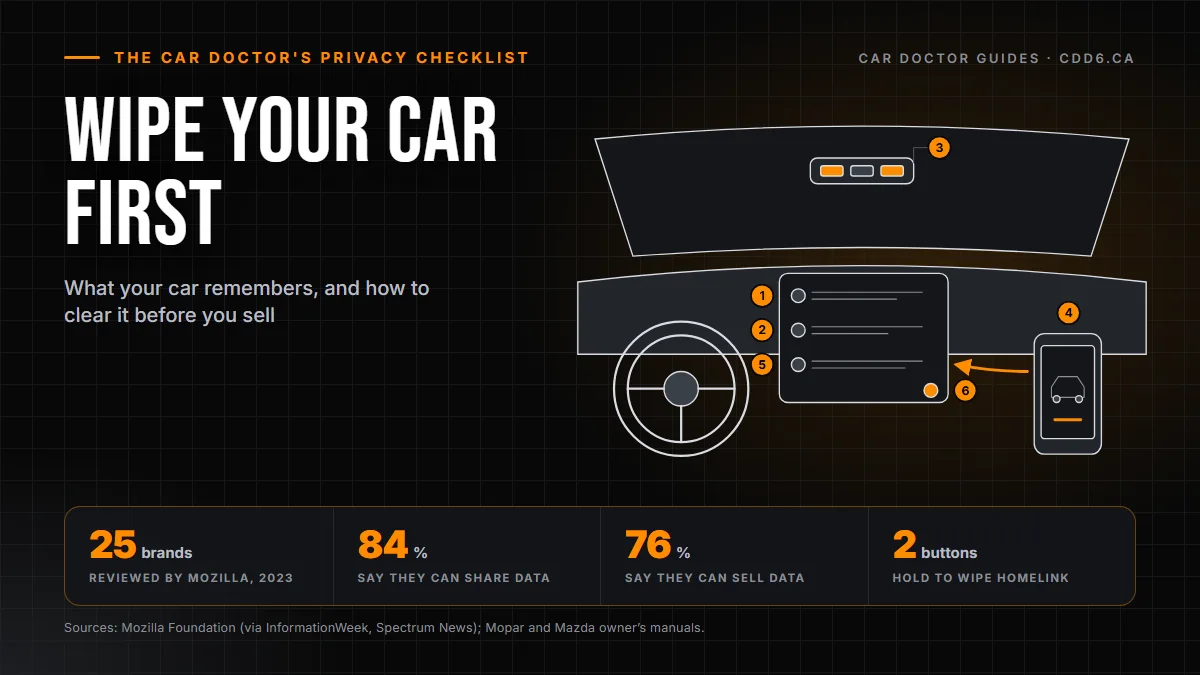
Before you sell or trade in a car, clear it the way you would clear an old phone. Unpair every phone, delete saved addresses, erase the HomeLink garage codes, remove the car from your connected-car app and cancel its subscription, then run the factory reset in the infotainment settings. Do it in that order, and check the screens afterward.
Most of us would never hand a stranger an unlocked phone, yet plenty of us hand over a car that still knows where we live. Nobody means to; we just do not think of the dashboard as a computer. It is one. Here is the full checklist.
What does your car actually remember about you?
More than most people expect. The US Federal Trade Commission’s consumer alert on selling a car lists the usual suspects: contacts and address books copied over when you synced your phone, logins and stored data for apps, the places you drive to, including home and work, and the codes for your garage door. Consumer Reports adds call logs, text messages and saved camera footage to the list of things to check for.
Where your data sits in the car
- Paired phonesThe car can keep contacts synced from your phone, plus call and message logs.
- NavigationHome, work and the places you drove to.
- Garage door buttons (HomeLink)With the ignition on, hold the two outer buttons until the light flashes. That erases every channel at once.
- The maker's appRemove the car from your account. Deleting the app from your phone is not enough.
- SubscriptionsConnected services, a Wi-Fi hotspot plan or satellite radio: cancel them or move them to your next car.
- Factory resetUsually under settings, account information or profile. Check the menus again afterwards.
Work through the numbers in order; the reset comes last. Simplified drawing; the layout differs between vehicles.
Source: US Federal Trade Commission and Consumer Reports; HomeLink steps from the RAM owner's manual (Mopar) and the Mazda CX-5 owner's manual.
The automakers keep data too, on their side. In September 2023 the Mozilla Foundation reviewed the privacy policies of 25 car brands. As InformationWeek and Spectrum News both reported, 84 per cent of those brands said they could share drivers’ personal data and 76 per cent said they could sell it. Only two, Renault and Dacia, said drivers could have their data deleted. You cannot fix the automaker’s servers from the driver’s seat, but you can stop handing the next owner a copy of your life.
What 25 car brands said they could do with drivers’ personal data
Two of the 25 brands, Renault and Dacia, said drivers could have their data deleted: 8 per cent.
Source: Mozilla Foundation, Privacy Not Included review of 25 car brands (September 2023), as reported by InformationWeek and Spectrum News.
The checklist: what to clear and where to find it
| What to clear | Where it usually lives | How to clear it |
|---|---|---|
| Paired phones, contacts, call and message logs | Phone or Bluetooth settings on the infotainment screen | Delete or "forget" each paired device, then confirm the phone book and recent calls are empty |
| Saved addresses: home, work, favourites, recent trips | Navigation menu | Delete them one by one if you can; the factory reset should catch the rest |
| Garage door codes (HomeLink) | Buttons on the mirror, visor or overhead console | Hold the two outer buttons until the indicator light flashes; this erases every channel |
| Connected-car app and account | The automaker’s phone app and website | Remove the vehicle from your account; deleting the app from your phone is not enough |
| Subscriptions: connected services, Wi-Fi hotspot data plan, satellite radio | Your account with the automaker or provider | Cancel them, or move them to your next vehicle |
| Everything else on the head unit | Settings, often under System, General or Profile | Run the factory reset, then go back and check each menu |
Source: Compiled from the FTC consumer alert, Consumer Reports and the HomeLink sections of the Mopar and Mazda owner’s manuals. Menu names vary by brand and year: check your owner’s manual.
Clear it in this order
Unpair every phone
Delete or forget each device in the phone settings on the screen.
Clear the navigation
Home, work, favourites and recent destinations.
Erase the garage door codes
Hold the two outer HomeLink buttons until the light flashes.
Remove the car from your app
In the maker's app or website, not just by deleting the app.
Cancel or move subscriptions
Connected services, Wi-Fi data plans and satellite radio.
Factory reset, then check
Run the reset in settings and look through the menus again.
Start with your phone and the navigation
Open the phone or Bluetooth settings on the screen, find the list of paired devices and delete each one. Consumer Reports describes this as choosing forget or unpair on every phone in the list. Do the same for anyone else in the house who ever connected, including the teenager who borrowed the car once.
Then go into the navigation and clear home, work, favourites and recent destinations. The reset at the end should wipe these too, but deleting them yourself means you are not relying on one button doing everything.
How do I clear HomeLink garage door codes?
If your car opens your garage, the next owner’s car can too until you erase it. On most HomeLink systems the method is the same: with the ignition on, press and hold the two outer HomeLink buttons together until the indicator light starts flashing, then let go. The Mopar owner’s manual for RAM trucks says to hold for up to 20 seconds; the Mazda manual says about 10. Go by the light, not the clock.
Two things to know. This erases all the channels at once; you cannot clear just one. And Mazda’s manuals specifically tell owners to make sure HomeLink has been erased before selling. If your system looks different, your owner’s manual has the steps for that vehicle.
Remove the car from your connected app and cancel the subscription
This is the step people skip, and it matters most. A manufacturer app that can find, lock or start the car stays tied to it after the sale, according to the FTC. Consumer Reports makes the same point: deleting the app from your phone does nothing. You have to sign in and remove the vehicle from your account. Then sign in again and make sure the car is no longer listed.
Next, cancel the paid services or transfer them to your next car: connected services, a Wi-Fi hotspot data plan, satellite radio. The Drive points out that brands generally leave cancelling a connected service to the owner when the car is sold, so do not assume it ends on its own.
Driving a Chrysler, Dodge, Jeep or RAM? The Uconnect sections of Stellantis owner’s manuals for RAM trucks (2013 and 2014) recommend removing your Uconnect account before you sell, and note that removing it cancels the subscription. The menus differ by radio and model year, so follow the manual for your vehicle.
How do I factory reset the infotainment system?
Look in the settings on the screen. Consumer Reports says the reset is usually found under a menu named settings, account information or profile; on many cars it sits under System or General. If you cannot find it, the owner’s manual will tell you where it is.
Do not stop there. The FTC warns that a reset may still leave work to do, and Consumer Reports recommends going back through the phone, navigation and camera menus to confirm that call logs, messages, saved addresses and video are really gone. If something survived, run the reset again or clear it by hand.

Bought a used car or driving a rental? Clear the last driver’s data
The same checklist works in reverse. In a used car you just bought, delete phones you do not recognize, erase the old HomeLink codes before programming your own, and set up the connected app under your own account. The previous owner should have cancelled theirs, but check.
In a rental, protect yourself before you hand the keys back. As Global News reported from FTC guidance, a rental can hang on to your phone number, call and message logs, and even your contacts and texts. Go into the settings, find your phone and delete it. It takes a minute.
Do this before the rest of the sale paperwork
Wiping your data is one line on a longer list. If you are selling privately in Ontario, read my checklist before selling a car in Ontario, which covers the Used Vehicle Information Package, the safety certificate, your plates and getting paid safely. If you would rather trade in, you can bring the car to Golden Mile Chrysler on Eglinton, or browse our used cars while you are at it. Questions about your trade? Get in touch.
Wiping Your Car’s Data: Common Questions
Does a factory reset delete everything from my car?
Not always. The FTC notes that a reset can still leave work to do, and Consumer Reports suggests checking the phone, navigation and camera menus afterward. A reset also does nothing to your account with the automaker, so remove the car from your connected app separately and cancel any subscription.
How do I erase HomeLink garage door codes before selling?
With the ignition on, press and hold the two outer HomeLink buttons until the indicator light flashes, then release. That clears every channel at once. Mopar’s RAM manual says it can take up to 20 seconds and Mazda’s says about 10, so watch the light. Check your owner’s manual if your buttons look different.
Is deleting the car app from my phone enough?
No. Consumer Reports says removing the app from your phone does not unlink the car. Sign in to your account, remove the vehicle, and cancel or transfer any connected subscription. Do it a few days before the sale so there is time to confirm the car is off your account.
What data does a car store from my phone?
When you pair a phone, the car can copy your contacts and address book, and keep call and message logs, according to the FTC and Consumer Reports. The navigation also stores your home and work addresses and recent trips. Delete paired phones and saved places, then run the factory reset.
How do I remove my Uconnect account before selling a Chrysler, Dodge, Jeep or RAM?
Stellantis owner’s manuals recommend removing your Uconnect account before you sell, and say this cancels the subscription. Depending on the radio, you do it from the touchscreen or through the owner website. Menus change by model year, so follow the Uconnect section of your own owner’s manual.
Should I delete my phone from a rental car?
Yes. FTC guidance reported by Global News says a rental can keep your phone number, call and message logs, and even contacts and texts after you return it. Before you hand back the keys, open the infotainment settings, find your phone in the device list and delete it.
Talk to the Car Doctor
Straight answers, no games, no runaround. The line is open.
437-524-1747