
Key Fob Battery Dead? How to Get In, Start the Car and Fix It

By Navin Kotecha, The Car Doctor
Published
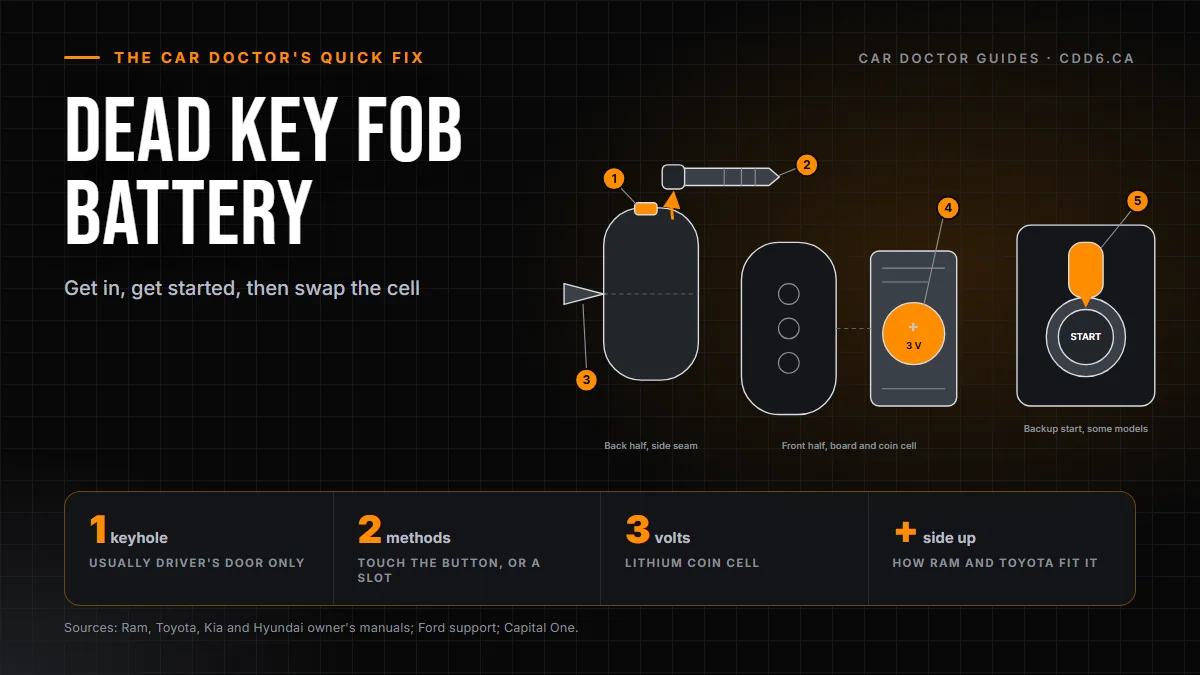
A dead key fob battery almost never leaves you stranded. Slide out the metal key tucked inside the fob and open the driver's door with it. Then start the car with the backup method in your owner's manual: either touch the fob to the start button or set it in a backup slot. Afterwards, fit a fresh coin cell.
It usually happens at the worst time: a dark parking lot off the 401, groceries in hand, and a button that does nothing. Here is the calm version. How to tell the battery is fading, how to get in, what to do if the alarm goes off, how to start the car, and how to tell when the battery is not the problem at all. Every vehicle does this a little differently, so keep your owner's manual nearby. I will point out where the steps vary.
How do I know my key fob battery is getting low?
Many fobs warn you before they quit. Two signs appear in more than one manufacturer's manual. The first is a low key battery message on the dash: the 2022 Ram Heavy Duty and the 2025 Toyota Tacoma manuals both describe one in the instrument cluster. The second is the small light on the fob staying dark when you press a button. Both of those manuals treat that as a sign the cell needs changing.
Before you blame the battery, rule out interference. Ram, Kia, Hyundai and Toyota all caution that a phone, laptop or similar electronics sitting right next to the fob can block its signal. Pull the fob out of the pocket it shares with your phone and try again. If you have a spare fob at home, try it; if the spare works, the first fob is the problem.
Where is the hidden key inside my fob?
Most smart fobs carry a small metal key for exactly this moment. How you free it depends on the design: some have a push button on the side, some a sliding latch on the back, and some a cover that pulls off. If nothing is obvious, look for a seam or tab, and check the keys section of your owner's manual. Keep that metal key with the fob afterwards; you will want it next time too.
Where is the keyhole if my door handle doesn't seem to have one?
It is usually there, just hidden. On many newer vehicles the lock cylinder sits behind a small plastic cap at the end of the driver's door handle, so the handle looks clean. The usual routine: pull the handle out, find the little slot or hole near the cap, use the tip of the metal key to release it, and lift the cap off to uncover the lock. Go gently, because the cap is plastic.
On most vehicles only the driver's door has a keyhole, so that is where to start. Turn the key to unlock, open the door, and get in. Snap the cap back on once you are moving again.
Why does the alarm go off when I unlock with the key?
Because the car cannot tell you apart from someone who forced the lock. When you lock with the fob, the security system arms, and on many vehicles a door opened with the metal key instead of the fob counts as an intrusion. The Ram manual says using the key cylinder while the system is armed will set off the alarm once the door opens, and the Hyundai, Kia and Toyota manuals describe the same thing.
You do not need to do anything drastic. Get in, close the door and start the car using the backup method below. Ram says moving the ignition out of OFF disarms its system, Kia lists starting the engine as one way to disarm, and Hyundai tells you to open up with the metal key and then start the engine with the smart key. On some models, including Hyundai and Kia, the alarm also shuts off by itself after roughly 30 seconds.
How do I start a push-button car with a dead key fob?
Even with a weak battery, the car can usually still read the fob if you bring it right up to the reader. Manufacturers do this one of two ways.
Touch the start button with the fob. The Ram, Kia and Toyota manuals all describe pressing or touching the start button with the fob itself, foot on the brake and the vehicle in Park. Which end or face of the fob has to touch the button differs from model to model, so check your manual for that detail.
Set the fob in a backup slot or pocket. Hyundai's manual and Ford's support pages describe a dedicated spot where you place the fob before pressing start. Ford mentions a pocket in the centre console or a slot on the steering column, and Capital One also points to the centre console as the usual place.
Driving a Jeep, RAM, Chrysler or Dodge with push-button start? In the 2022 Ram Heavy Duty manual the backup method sits under Keyless Enter 'n Go Ignition, and it is the touch-the-button kind. Years and models differ, so look up the same section in your own manual before you need it.
| Situation | What the manuals describe | Confirmed in |
|---|---|---|
| Warning signs | A low key battery message in the instrument cluster, and a fob light that no longer comes on | 2022 Ram Heavy Duty, 2025 Toyota Tacoma |
| Getting in | A metal key stored inside the fob, used in the driver's door | Ram, Toyota, Kia, Hyundai, Ford |
| Hidden keyhole | Lock cylinder under a removable cap on the driver's door handle | Hyundai, Capital One |
| Alarm | Opening a door with the metal key while the system is armed can set it off | Ram, Toyota, Kia, Hyundai |
| Backup start, touch | Press or touch the start button with the fob | Ram, Kia, Toyota |
| Backup start, slot | Place the fob in a backup slot or pocket, then press start | Hyundai, Ford |
| Battery size | CR2032 in the Ram fob; CR2450 in the Toyota, Kia and Hyundai fobs | Each brand's own manual |
Source: Owner's manuals: 2022 Ram 2500/3500, 2025 Toyota Tacoma, 2026 Kia and 2026 Hyundai; Ford support; Capital One.
Inside a smart key fob
- ReleaseDepending on the fob, it is a push button, a slide or a cover that pulls off, and it frees the mechanical key.
- Mechanical keyUse it to unlock the driver's door when the fob battery is flat.
- Case seamOnce the key is out, pry the case apart at the seam with a thin tool.
- Coin cellA 3-volt lithium cell, fitted plus side up. Put it in the wrong way round and it drains and the fob stops working.
- Backup startOn some models you touch the start button with the fob, foot on the brake and the shifter in Park.
Handle the new cell with clean, dry hands, and keep spare coin cells away from children. Simplified drawing; the layout differs between vehicles.
Source: Owner's manuals from Ram, Toyota, Kia and Hyundai, and Ford.
How do I replace a key fob battery?
Most fobs run on a flat 3-volt lithium coin cell, but they do not all take the same one. The Ram manual calls for a CR2032, while the Toyota, Kia and Hyundai manuals list a CR2450. Do not guess: check the size printed on the old battery, or look it up in your manual, before you buy.
The general steps, which your manual will refine: take the metal key out first, since on many fobs that uncovers the seam. Open the case at the seam with a small flat screwdriver or a similar thin tool, working gently. Note which way the old cell faces before you remove it; the Ram and Toyota fobs both take the new one with the plus side up. Handle the new cell with clean, dry hands, fit it the same way round, then snap the case shut with no gaps and slide the key back in.
Getting it the right way round matters: Kia and Hyundai both warn that a cell installed backwards will drain and leave the fob dead. Ram and Toyota go further and recommend having a dealer change it, since a slip with the screwdriver can damage the fob. If you would rather not pry it open yourself, that is a reasonable call.
Keep coin cells away from children. Every manual I checked carries the same warning: a swallowed button battery can cause severe internal burns within about two hours. If you think a child has swallowed one, get emergency medical help right away.
Swapping the fob battery
Remove the key
Slide or press the release and take out the mechanical key.
Open the case
Pry the two halves apart at the seam with a thin tool.
Fit the new cell
Plus side up, handled with clean, dry hands.
Close it and test
Snap the case shut and try the lock buttons.
Mind the old cell
A swallowed coin cell can cause severe burns within about two hours. Get emergency help if a child swallows one.

What if a new battery doesn't fix it?
Then the battery probably was not the problem. Check the basics first: right size, right way up. If your spare fob works and this one does not, the fob itself may be damaged or no longer paired to the car. That is dealer work. The Ram manual says only fobs programmed to the vehicle can start it and that an authorized dealer does the programming, and Toyota and Ford both say to bring every key you have when you go in.
If neither fob works and the car shows no sign of life, the car's own 12 V battery is the more likely culprit. Hyundai lists a discharged vehicle battery among the reasons a smart key may stop working, and Capital One notes that jump-starting the car can bring back fob access. If what you need is the trunk, read how to open your trunk when the car battery is dead.
Got a Jeep, RAM, Chrysler or Dodge fob that still will not cooperate? Call the team at Golden Mile Chrysler on Eglinton, bring all your keys, and we will sort out whether it needs a battery, programming or a replacement. Shopping for something newer instead? Have a look at our used cars.
Dead Key Fob Battery: Common Questions
Can I start my car if the key fob battery is dead?
Usually, yes. Push-button cars have a backup method for a weak fob. Depending on the vehicle, you either touch the start button with the fob, as the Ram, Kia and Toyota manuals describe, or set the fob in a backup slot or pocket, as Hyundai and Ford describe. Your owner's manual shows which one your car uses.
Where is the metal key hidden in a key fob?
Inside the fob itself. Depending on the design, you free it by pressing a release button, sliding a latch on the back, or pulling off a cover. The key opens the driver's door, where the lock cylinder is often hidden under a small cap on the handle.
Why did my car alarm go off when I unlocked it with the key?
On many vehicles the security system arms when you lock with the fob, and opening a door with the metal key looks like a break-in. Starting the car with the backup method usually disarms it, and on some models, such as Hyundai and Kia, the alarm stops by itself after about 30 seconds.
What battery does a key fob take?
Usually a 3-volt lithium coin cell, but the size varies. The Ram manual we checked calls for a CR2032, while Toyota, Kia and Hyundai manuals list a CR2450. The easiest way to be sure is to read the size printed on the old battery, or check your owner's manual.
How long does a key fob battery last?
Manufacturers give different answers. The 2025 Toyota Tacoma manual says one to two years, the 2022 Ram Heavy Duty manual says at least three years with normal use, and Kia says several years. Watch for a dash message or a fob light that no longer comes on.
Can my phone stop my key fob from working?
It can. Ram, Kia, Hyundai and Toyota all warn that a phone or other electronics right beside the fob can block its signal. Before you replace the battery, move the fob away from your phone and try again, or test your spare fob.
How do I know if it's the fob battery or the car battery?
If the spare fob works, the problem is the first fob or its battery. If neither fob works and the car shows no sign of power, suspect the car's 12 V battery. Hyundai lists a discharged vehicle battery as a reason a smart key can fail, and jump-starting can restore fob access.
Talk to the Car Doctor
Straight answers, no games, no runaround. The line is open.
437-524-1747